

FHYDES
Calls and chat with your Fhydes ID. App registration does not ask for your personal phone number or email address.

It doesn’t ask who
you are.
Create a Fhydes ID for calls and chat without entering your personal phone number or email address in the app registration flow. Online code purchases use an email address for purchase information.


Calling and chat for your team.
Use Fhydes for calls and chats with colleagues. Review your company’s requirements and device security before sharing sensitive business information.
Connect with your contacts.
Use your Fhydes ID for calling and chat. Choose your contacts carefully and review the settings available in the app.


Your conversations stay private, even if you lose your phone.
It’s set up for automatic history clearing by default. Easy security levels adjusting thanks to predefined profiles.
Encryption for chat content and attachments.
Fhydes includes encryption mechanisms for chat content and attachments. Protect your device and account, and share information only with contacts you trust.


App features and website privacy.
Using a Fhydes ID does not mean that no technical data is processed. Website purchases and support requests use personal information; see the website Privacy Policy.


Create a Fhydes ID in the app. Before sharing sensitive information, review your account and conversation settings and choose contacts carefully.
Automatically and permanently deletes the conversation history for all its participants (not only on your device!). There will be no trace of your chats and messages, even if your phone is stolen, lost, turned off, cut off from the internet…
Protect your phone and account-access information. Screen protections do not guarantee that another person cannot copy shared information or photograph a screen.
Create a Fhydes ID in the app. Before sharing sensitive information, review your account and conversation settings and choose contacts carefully.
Automatically and permanently deletes the conversation history for all its participants (not only on your device!). There will be no trace of your chats and messages, even if your phone is stolen, lost, turned off, cut off from the internet…
Protect your phone and account-access information. Screen protections do not guarantee that another person cannot copy shared information or photograph a screen.
-
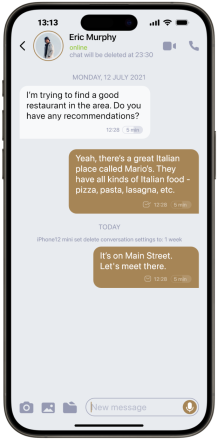
Create a Fhydes ID in the app. Before sharing sensitive information, review your account and conversation settings and choose contacts carefully.
-
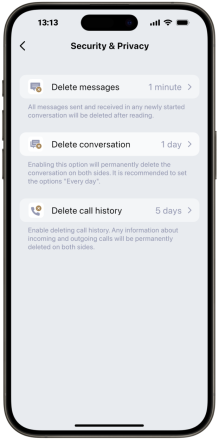
Automatically and permanently deletes the conversation history for all its participants (not only on your device!). There will be no trace of your chats and messages, even if your phone is stolen, lost, turned off, cut off from the internet…
-
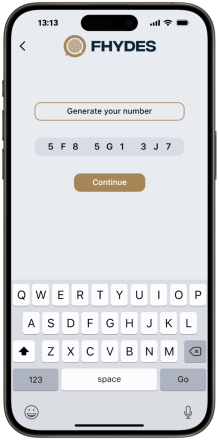
Protect your phone and account-access information. Screen protections do not guarantee that another person cannot copy shared information or photograph a screen.


